
FastLED_ArduinoGFX_TFT: FrameBuffer::GFX Support for TFT Screens like SSD1331, ST7735, or ILI9341 with Adafruit GFX and FastLED APIs using Arduino_GFX
Adafruit_GFX and FastLED-compatible library for TFT displays like SSD1331, ILI9341 or ST7735.
Please read details: http://marc.merlins.org/perso/arduino/post_2022-01-02_FastLED_ArduinoGFX_TFT-on-top-of-Framebuffer_GFX-for-SPI-TFTs-like-SSD1331-or-ILI9341.html
Note that this is a new version of https://github.com/marcmerlin/FastLED_SPITFT_GFX but instead of the multiple adafruit drivers, some being honestly better than others, and the SPI implementation is not as reliable on each chip, this uses moononournation's https://github.com/moononournation/Arduino_GFX which supports a lot of TFTs and with optimized SPI backends for better speeds and fixes issues of HWSPI not working at all on ESP32 for SSD1331 in the adafruit driver: adafruit/Adafruit-SSD1331-OLED-Driver-Library-for-Arduino#27 .
With Arduino::GFX, for SSD1331, I now get around 160fps on ESP32 at 80Mhz)
You also get rotation support which is not supported on SSD1331 in the adafruit driver
( adafruit/Adafruit-SSD1331-OLED-Driver-Library-for-Arduino#26 )

Why would you use this lib? It's not as efficient as using Adafruit::GFX directly inside Arduino_GFX?
If all you use is Adafruit::GFX, you should not use my lib, it adds unnecessary overhead.
Pros:
- Because you have a framebuffer, your code can read the framebuffer and do operations like CRGB scale8 or fadeToBlackBy. You can also use/write code that mirrors the screen, or scrolls it in ways not supported by the TFT driver.
- More generally you can read pixels back from the framebuffer (TFTs are normally write only)
- https://github.com/marcmerlin/Framebuffer_GFX Support means you get support for FastLED and LEDMatrix 2D code (see http://marc.merlins.org/perso/arduino/post_2020-03-16_Framebuffer_GFX_-Choosing-between-its-3-2D-APIs_-FastLED-XY_-NeoMatrix_-and-LEDMatrix_-and-detail-of-its-many-supported-hardware-backends.html )
- Compatible with code using 24bit RGB888/CRGB data types (they will be converted back down to RGB565 16 bit color).
- Code you write against FrameBuffer::GFX (which supports FastLED_ArduinoGFX_TFT, this lib), will work against any other supported hardware backend (SmartMatrix, FastLED Matrix, Linux ArduinoOnPC to write and debug your code on linux with gdb)
- You can mirror a 96x64 SmartMatrix FrameBuffer onto an SSD1331 TFT. This is the cool part, you can have multiple framebuffers, or you can share the same framebuffer between some other display and a TFT, or even 2 TFTs.
For instance this same 96x64 demo can run on a P3 RGBPanel and an SSD1331 (in this picture with 2 CPUs, but it can run on a single one with the same framebuffer sent to 2 hardware backends):
Cons:
- It is slower of course, TFT is updated by writing the entire framebuffer. This can be as slow as 15fps on a big display over SPI, but will be 100fps+ on smaller ones, so the speed probably won't matter
- It uses more memory. The framebuffer is stored in 24bpp (when only 16bpp are actually needed for TFTs). If you have an ILI9341 on ESP32 without PSRAM, the entire framebuffer won't fit, but the code allows to allocate a portion of the framebuffer (top half and bottom half) if that works for you.
- https://github.com/marcmerlin/FastLED_ArduinoGFX_TFT/tree/master/examples/MatrixGFXDemo is a basic example
- https://github.com/marcmerlin/FastLED_NeoMatrix_SmartMatrix_LEDMatrix_GFX_Demos/tree/master/LEDMatrix/LEDText shows an example of using LEDMatrix and LEDText (using CRGB888) on top of a TFT (framebuffer converted back down to RGB565 by this lib and sent to the TFT via Arduino_GFX)
- https://github.com/marcmerlin/FastLED_NeoMatrix_SmartMatrix_LEDMatrix_GFX_Demos/blob/master/neomatrix_config_tftonly.h is an simplified config file that only works for TFTs but is shorter to read and easier to understand
- https://github.com/marcmerlin/FastLED_ArduinoGFX_TFT/tree/master/examples/DualTFTDisplay shows how to control 2 different TFTs
SSD1331 (96x64) vs ST7735 (128x128) vs ST7735 (160x128) vs ILI9341 (320x240):
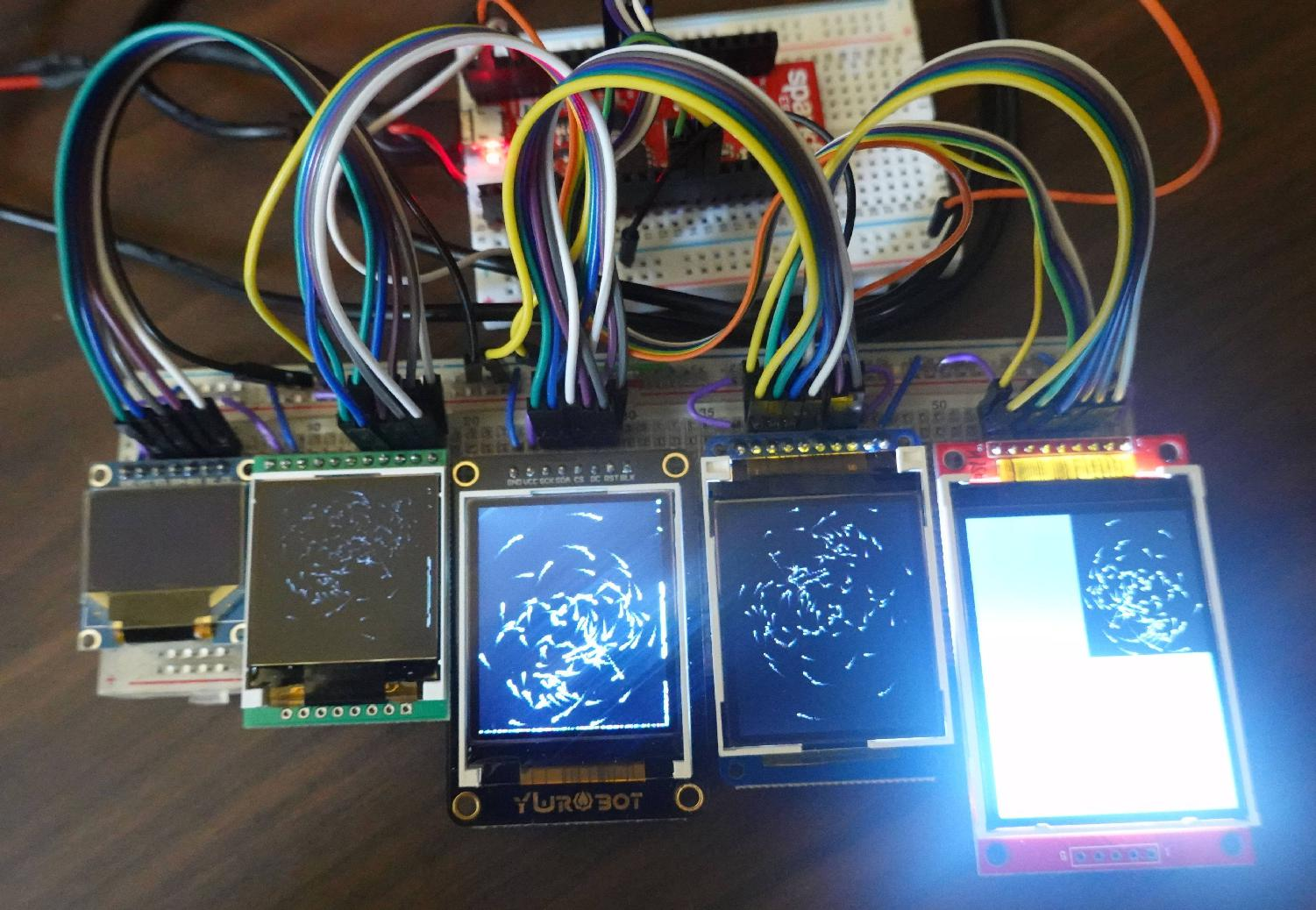 (note that the ESP32 was sending ST7735 160x128 SPI which didn't work at all on SSD1331 and not quite on the ILI screen which requires its own protocol)
- 128x160 video demo of TableME: https://www.youtube.com/watch?v=0-Fq1s2xQbM
- 128x128 video demo of Aurora: https://www.youtube.com/watch?v=YwbfFoFp0ko
The big thing to note is that this library has to store the entire framebuffer in memory, so you'll need a processor with more RAM (like ESP8266, ESP32, Teensy, etc...), but then you benefit from having the entire framebuffer in memory which is used for code that apply transformations to the entire framebuffer like fading or rotations.
https://github.com/marcmerlin/Framebuffer_GFX/blob/master/README.md details the 3 APIs available
to you and why you'd want to use this layer on top of the SSD1331 driver.
Similarly this driver works great with ST7735 based TFTs (128x128 or 128x160).
It does also work with ILI9341, but memory becomes an issue as the framebuffer uses 224KB of RAM
which only fits on a teensy 3.5/3.6 for me (too big for ESP32) and leaves very little room to run other code.
Actually if you have an ESP32 with PSRAM, then it works perfectly fine.
This library requires FastLED and Adafruit_GFX libraries as well as this base class library:
- https://github.com/marcmerlin/Framebuffer_GFX Please look at the Framebuffer_GFX page for details on how the APIs work and you can also look the example demo code:
- https://github.com/marcmerlin/FastLED_ArduinoGFX_TFT/tree/master/examples/MatrixGFXDemo
You can find a lot of demo code here: https://github.com/marcmerlin/FastLED_NeoMatrix_SmartMatrix_LEDMatrix_GFX_Demos as well as a big integrated demo here: https://github.com/marcmerlin/NeoMatrix-FastLED-IR
This library requires https://github.com/moononournation/Arduino_GFX
and these:
- https://github.com/marcmerlin/Framebuffer_GFX (base class)
- https://github.com/adafruit/Adafruit-GFX-Library
- https://github.com/FastLED/FastLED
- https://github.com/marcmerlin/LEDMatrix is optional if you have code that uses that API