

Free PrestaShop module to inject custom CSS, JavaScript and HTML into the <head>, right after <body> or right before </body> — without editing your theme.


Product page · Documentation · Download the latest release · More PrestaShop modules by DataFirefly
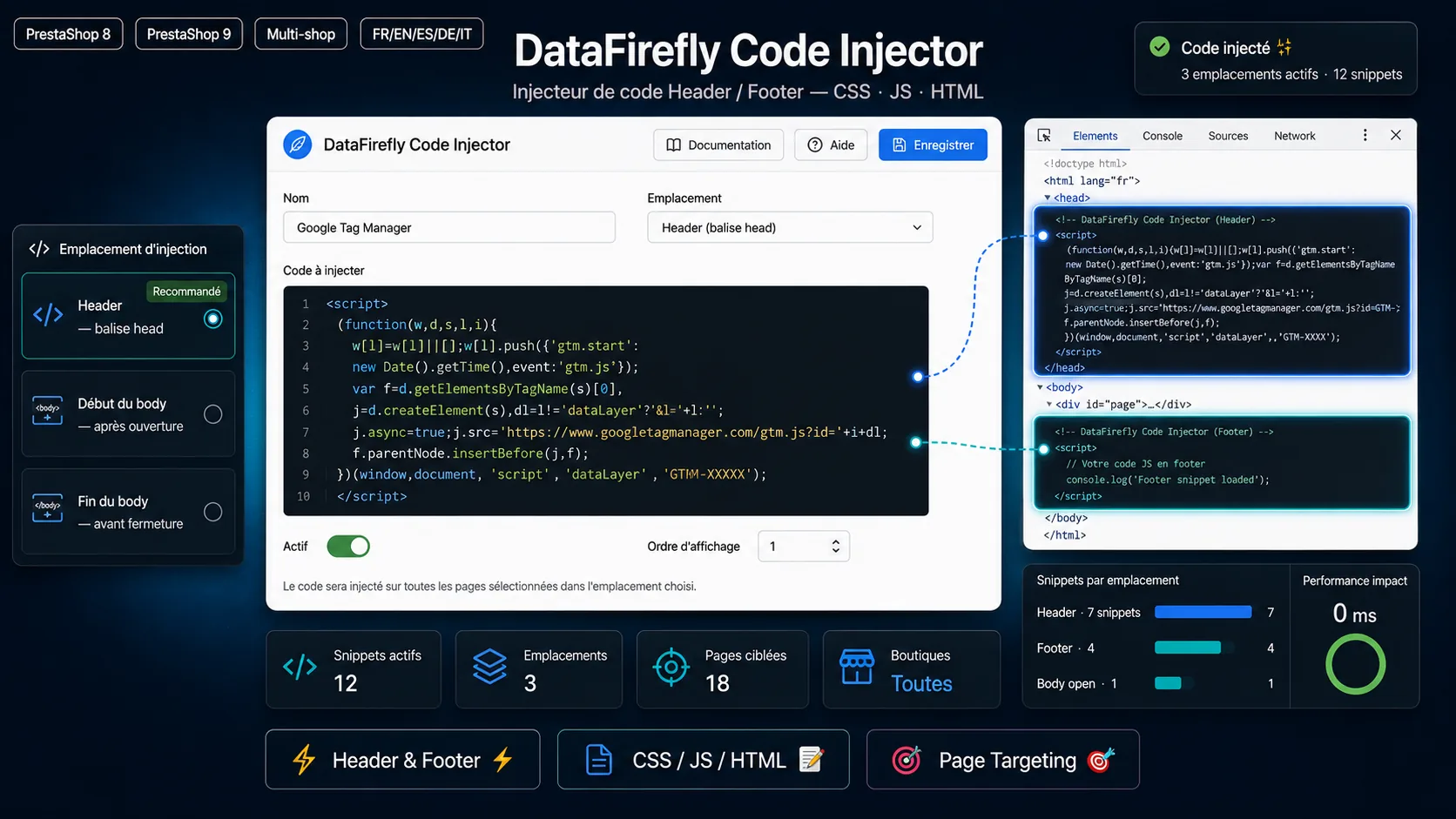

Adding a Google Tag Manager container, a Google Analytics 4 tag, a Meta (Facebook) Pixel, a Google Search Console verification meta tag or a few lines of custom CSS to a PrestaShop store usually means editing head.tpl or layout-both-columns.tpl — changes that are lost at the next theme update.
Header/Footer Code Injector (dfcodeinjector) by DataFirefly gives you a clean back-office screen to manage all those snippets instead. The code is injected through PrestaShop hooks, exactly as you pasted it, and survives theme and core updates.
- Three injection points: inside the
<head>tag, right after the opening<body>tag, right before the closing</body>tag. - Works with every theme: when a theme does not call
displayAfterBodyOpeningTag/displayBeforeBodyClosingTag, the code is spliced directly into the page HTML (automatic fallback, new in 1.1.0). - CSS, JavaScript and HTML:
<style>,<script>,<link>,<meta>,<noscript>… injected untouched — no HTMLPurifier, no escaping. - Unlimited snippets, each with its own on/off switch and injection order.
- Page targeting: all pages, only selected pages, or all pages except selected ones (home, category, product, CMS, cart, checkout, order confirmation, my account, 404… plus any module page such as
module-modulename-controller). - Test mode: inject a snippet only for the maintenance IP addresses (CIDR ranges supported) to check it on the live store before going public.
- Duplicate a snippet in one click (the copy is created disabled, for review).
- Multistore: a snippet can target all stores or a single store.
- Fast: one SQL query per page view, whatever the number of snippets and locations.
- Back office in 8 languages: English, French, Spanish, German, Italian, Dutch, Polish, Portuguese.
- Clean uninstall: the module removes its table and admin tab.
| Need | Location |
|---|---|
| Google Tag Manager (script part) | Header (<head>) |
Google Tag Manager (<noscript> iframe) |
Body start |
| Google Analytics 4 / gtag.js | Header |
| Meta Pixel, TikTok Pixel, Pinterest Tag, LinkedIn Insight | Header or body end |
Google Search Console / Bing / Pinterest site verification <meta> |
Header |
| Conversion tracking on the thank-you page | Body end, targeted to order-confirmation |
| Custom CSS fixes or a promo banner style | Header |
| Live chat, review or consent widgets | Body end |
| JSON-LD structured data | Header or body end |
- PrestaShop 8.0 to 9.x (multistore supported)
- PHP version supported by your PrestaShop release (PHP 7.2+ for PrestaShop 8, PHP 8.1+ for PrestaShop 9)
From the back office (recommended)
- Download
dfcodeinjector-x.y.z.zipfrom the latest release or from the DataFirefly product page. - Go to Modules > Module Manager > Upload a module and drop the zip.
- Click Configure to open the snippet manager.
With Git
cd /path/to/prestashop/modules
git clone https://github.com/datafirefly-ltd/dfcodeinjector.git
Then install Header/Footer Code Injector from Modules > Module Manager.
- Configure the module, then Add a snippet.
- Give it a name (e.g. Google Tag Manager), choose the location and paste the complete code, tags included.
- Optionally restrict it to some pages, set its order, or enable test mode.
- Save. The snippet is live on the next page view.
Full guide: Header/Footer Code Injector documentation.
| Location | Hook | Fallback |
|---|---|---|
| Header | displayHeader |
— |
| Body start | displayAfterBodyOpeningTag |
inserted after <body …> via actionOutputHTMLBefore |
| Body end | displayBeforeBodyClosingTag |
inserted before </body> via actionOutputHTMLBefore |
Snippets are stored in the ps_df_code_snippet table. Page names match the theme's {$page.page_name} value (FrontController::getPageName()).
Does the module modify my theme files? No. Code is injected through PrestaShop hooks; no theme file is touched and your snippets survive theme updates.
Can I add Google Tag Manager or a tracking pixel? Yes. Paste the code supplied by the service into a snippet, choose the location (usually the header and the body start for GTM) and enable it.
Do the body locations work with custom themes? Yes. Since 1.1.0, if the theme does not call the body hooks, the module inserts the code directly into the page HTML.
Can I test a snippet before showing it to customers? Yes. Turn on Test mode: the snippet is only injected for the IP addresses listed in Shop Parameters > General > Maintenance.
Is it really free? Yes, this module is offered free of charge by DataFirefly.
| Language | Product page | Documentation |
|---|---|---|
| 🇬🇧 English | Header/Footer Code Injector | Docs |
| 🇫🇷 Français | Injecteur de code Header/Footer pour PrestaShop | Documentation |
| 🇪🇸 Español | Inyector de código Header/Footer para PrestaShop | Documentación |
| 🇩🇪 Deutsch | Header/Footer Code-Injektor für PrestaShop | Dokumentation |
| 🇮🇹 Italiano | Iniettore di codice Header/Footer per PrestaShop | Documentazione |
| 🇳🇱 Nederlands | Code-injector Header/Footer voor PrestaShop | Documentatie |
| 🇵🇱 Polski | Wstrzykiwanie kodu w nagłówku i stopce PrestaShop | Dokumentacja |
| 🇵🇹 Português | Injetor de código no cabeçalho e rodapé PrestaShop | Documentação |
🇫🇷 En bref — Module PrestaShop 8 et 9 gratuit pour ajouter du code CSS, JavaScript ou HTML dans le
<head>, après<body>ou avant</body>sans modifier le thème : Google Tag Manager, Google Analytics, Pixel Meta, balises de vérification, CSS personnalisé. Ciblage par page, ordre d'injection, mode test et multiboutique. Voir la fiche produit.
See CHANGELOG.md.
- Documentation: https://www.datafirefly.com/en/documentation/dfcodeinjector/
- Bug reports and feature requests: GitHub issues
- Other modules for PrestaShop, WooCommerce and Shopware: https://www.datafirefly.com/en/
Free module, © DataFirefly Limited. All rights reserved.
Made by DataFirefly — PrestaShop, WooCommerce and Shopware modules.