
Pure-Python, zero-dependency color palette toolkit
palettes provides pre-computed, display-ready and integer-indexed color lookup tables for any Python environment. It has zero dependencies on any other PyDevices library or external package — the Quick Start below runs on a bare Python with nothing else installed. See Support and platforms for where it is proven to run.
While palettes integrates seamlessly with PyDevices displays, it is a standalone utility useful for any Python project needing easy-to-access named and indexed palettes, including:
- Embedded & Hardware: RGB565 displays, addressable LEDs / NeoPixels, status indicators.
- Terminal & CLI Tools: ANSI terminal formatting, logs, status alerts.
- Data & Charts: Consistent categorical and sequential color mapping.
- Theme Engines: Swappable UI color palettes with human-readable color names.
Generates a smooth, continuous HSV-based color spectrum. Ideal for color pickers, circular progress rings, and continuous gradient animations:
from palettes import get_palette

# 360-step full saturation color wheel (16-bit RGB565)
wheel = get_palette(name="wheel", length=360, saturation=1.0, color_depth=16)
color = wheel[180]  # get color at hue angle 180°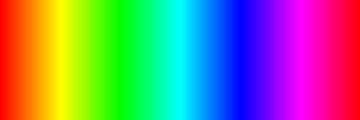
A curated collection of modern UI colors based on Google's Material Design palette:
material = get_palette(name="material_design", color_depth=16)
primary_color = material.RED_S500     # shades are attributes: <FAMILY>_S<shade>
accent_color  = material.BLUE_A400    # accents: <FAMILY>_A<shade>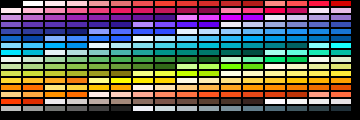
A structured 3D RGB color cube mapped into a discrete indexed palette. Excellent for retro imaging and color-space mapping:
cube = get_palette(name="cube", size=5, color_depth=16)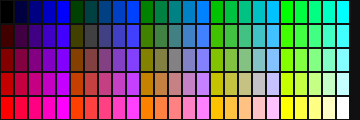
The classic 16 standard system colors:
win16 = get_palette(name="default", color_depth=16)
navy = win16[1]  # Black, Navy, Blue, Green, Teal, Lime, Cyan, etc.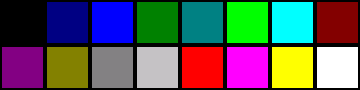
Nothing but palettes — this runs as it stands, on any of the four runtimes:
from palettes import get_palette

# A 360-step colour wheel, ready to write to an RGB565 display
wheel = get_palette(name="wheel", length=360, color_depth=16)
print("red, green, blue as RGB565: 0x%04X 0x%04X 0x%04X" % (wheel[0], wheel[120], wheel[240]))

# Named colours, by attribute
win16 = get_palette(name="default", color_depth=24)
print("RED is 0x%06X, and its name back again is %r" % (win16.RED, win16.color_name(12)))

# Material Design, 0xRRGGBB
md = get_palette(name="material_design", color_depth=24)
print("Amber 500 is 0x%06X" % md.AMBER_S500)
red, green, blue as RGB565: 0xF800 0x07E0 0x001F
RED is 0xFF0000, and its name back again is 'Red'
Amber 500 is 0xFFC107
Put those values on a screen and you need a display driver, which palettes
deliberately does not depend on. board_config is not installable from here —
it is a per-board file you copy onto the device from
pydevices/board_configs,
or that pydevices-desktop provides on a desktop:
import board_config          # from PyDevices/pydevices, not from palettes
from palettes import get_palette

display_drv = board_config.display_drv
palette = get_palette(name="wheel", length=display_drv.width, color_depth=16)

# Draw a full-width color spectrum band
for x in range(display_drv.width):
    display_drv.fill_rect(x, 0, 1, 40, palette[x])

display_drv.show()import mip
mip.install("palettes", index="https://PyDevices.github.io/mip")pip install -i https://test.pypi.org/simple/ \
--extra-index-url https://pypi.org/simple/ pydevices-palettespydevices-palettes is also parked on production PyPI, so a plain
pip install pydevices-palettes succeeds — one release behind. TestPyPI is the
current channel; use the command above.
git clone https://github.com/PyDevices/palettes && cd palettes
pip install -e .                                  # or just PYTHONPATH=lib
PYTHONPATH=lib python3 -m unittest discover -s tests
ruff check lib tests scripts
Those last two are what CI runs, so they cannot drift silently.
Full options: docs/index.md.
New to the implementation? Read the newcomer’s guide for the repository map, palette lookup path, compatibility contracts, and safe places to start contributing.
palettes is one pure-Python source tree with no runtime branches — the same
files run everywhere. What differs is the proof, labelled here with the org's
platform support tiers:
| Runtime | Tier | What backs it |
|---|---|---|
| CPython (desktop/server) | CI-proven | ruff and the unit tests run on ubuntu CPython 3.13 on every push |
| PyScript / WebAssembly | bench-proven | The live demo on the docs site executes in the browser |
| MicroPython | community-verified | Ships via MIP and is used by pdwidgets on the boards, but nothing in this repo proves it automatically |
| CircuitPython | community-verified | Same source, same expectation, and the same absence of a CI job |
The two community-verified rows have one cause: there is no MicroPython or CircuitPython job in this repo's workflow. Adding one is the cheap way to promote both, since the library imports nothing.
What's planned next is in ROADMAP.md.
- Documentation
- Source Code
- PyScript Live Demos (
palettes_demo.py) - Related: pydevices, pdwidgets, pydevices-examples
MIT — see LICENSE.